Customized Lead Actions
⚠️This feature is only available on the Expert & Dream Team Editions.
On each lead, there is an Actions menu. Actions inside this menu are predefined: assign the lead, edit it, change its status... But with the 'Customized Lead Actions' feature, you are able to add your own customized actions inside the Actions menu of your leads.
This is useful not only to feed your information system, but also to integrate your Pro Pipe Lines account with external apps such as WhatsApp, an IP phone, a software that sends SMS, and a lot more!
To add a personalized link to the "actions" menu of a lead, go to Admin panel > Integrations > Built-in Tools > Lead Actions Menu, and create an action that will point to a program you host. You can define several personalized actions. When clicking on "actions", it will open a new window with the target address.
Note that you can use Lead's variables (first name, phone number) to trigger specific actions, such as a call or a message.
Below is the example of a Lead Action set to fire off a message on WhatsApp:
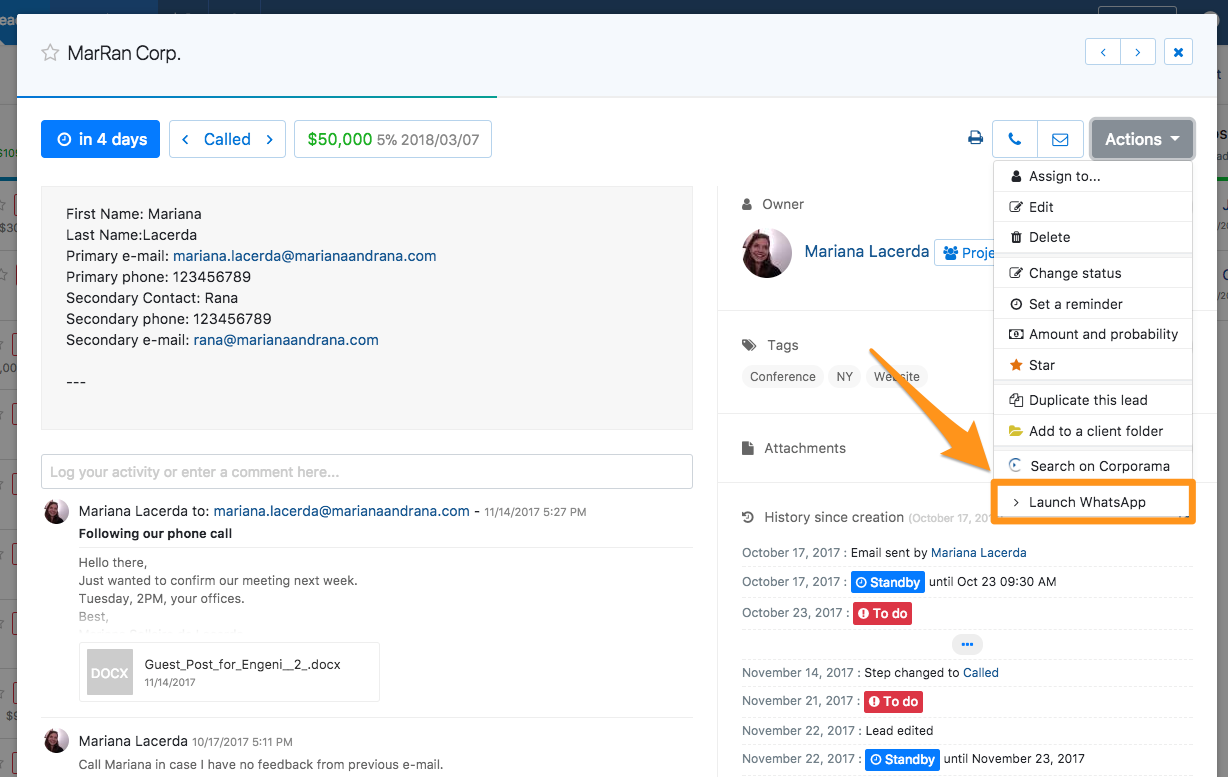
How to set up WhatsApp
More and more companies talk to potential customers on WhatsApp and need to be able to easily send them a message from their lead management software. With the Customized Lead Actions of Pro Pipe Lines, you'll be able to launch WhatsApp Web in a click to fire off a message to a potential customer.
Setting it up is quite easy, simply follow these steps:
- 1/ Go to your Admin Panel
- 2/ Choose Integrations > Built-in tools > 'Lead Actions Menu'
- 3/ Create a new Action
- 4/ Enter the name "Launch WhatsApp" for example
- 5/ Enter the following URL: https://api.whatsapp.com/send?phone=${lead_f_Phone}
- 6/ Save
- 7/ Enable the action you just created
⚠️Please make sure that all phone numbers include the country code (without space). For example +44 or 0044 for Great Britain.